Cloud recipe one-click whole wheat bread
Overview
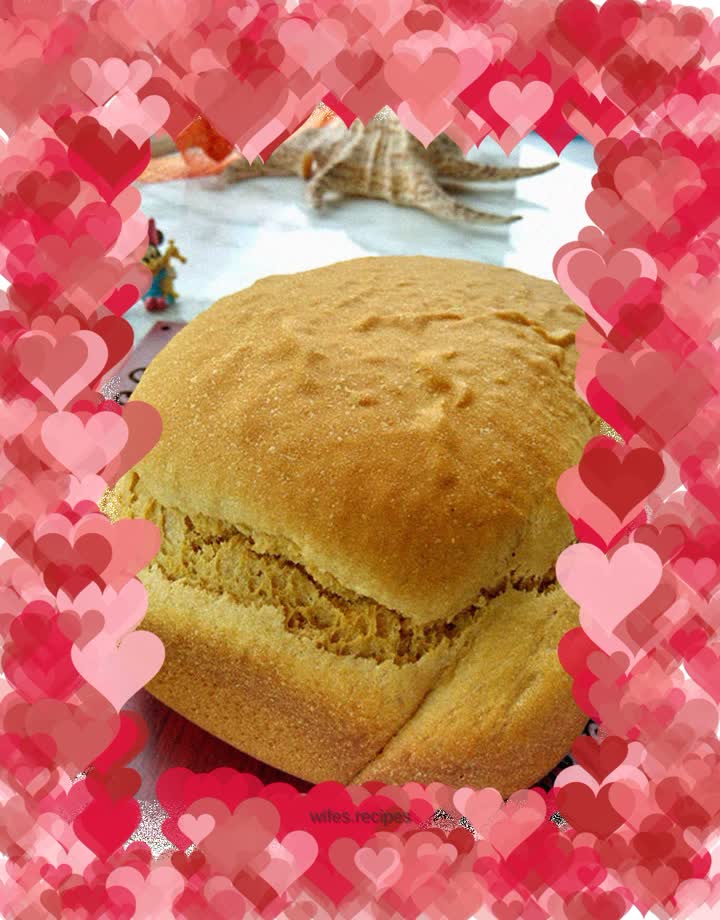
I fell in love with the whole wheat bread in Yun's recipe at first sight, but I just thought too little whole wheat flour was used. After some consideration, I decided to use 50 grams of whole wheat flour and reduce the amount of high-gluten flour accordingly. Turn on your phone, flip to the whole wheat bread, prepare the ingredients according to the recipe, put the bread bucket into the bread machine, close the lid, and start making it with one click. I immediately noticed how clear the phone’s operation is—each step has a clear time display, and there’s even a brief explanation of what the step does. With manual operation, you can only see various icons flashing in sequence on the bread machine's display screen, marking the current step, but there is no way to know the time required for that step. With one-click fool-proof operation, you can completely ignore its progress, but you still can't help but look at the progress on your phone in the gaps. It took too long, and finally I waited for a prompt and it was done. He immediately rushed to lift out the bread bucket. The color is okay. I didn't bother to set the dark burnt color, and the result was much lighter than the desired color. Perhaps it was the most common high-gluten flour used, perhaps too much whole-wheat flour was added. The bread was average in shape and had a big crack. It looked like a big, hideous mouth with ulterior motives and no good intentions. . . .
Tags
Ingredients
Steps
-
Ingredients: 135g milk, 1 egg, 20g butter, 25g brown sugar, 3g salt, 235g high-gluten flour, 50g whole wheat flour, 1 tsp dry yeast

-
Pour the eggs, milk, salt, sugar, and butter into the bread bucket,

-
Pour in high-gluten flour and whole wheat flour, make a pit and fill it with yeast.

-
Put the bread bucket into the bread machine,

-
Close the lid.

-
Open the whole wheat bread program on your mobile phone and click one button to make it,

-
A disclaimer pops up, click to find out,

-
Enter the weight and burning color selection interface,

-
Choose 500 grams, poke to start,

-
The bread machine enters preliminary mixing, which takes about 7 minutes.

-
The second step is to wake up,

-
The mobile phone prompts to put in the fruit, but there is no fruit to put in. We will talk about it later.

-
The bread machine enters rapid mixing,

-
After stirring ends, enter the first fermentation.

-
Wake up last.

-
Enter baking, and there are 25 minutes left to end the program.

-
When the baking is over, it says you’re done, let’s go take a look

-
Uncover,

-
Bring up the bread bucket,

-
Pour out the bread,

-
Place on a drying rack to cool.
